Sunday, January 12, 2014

Edmodo - A Great Way to Connect and Communicate With My Students

The past few months have been very exciting for me. Soon after assuming the position of Educational Technology Coach and Coordinator at my school, I deployed Google Apps for Education. The next step was bringing Blended Learning into our school. Our choice of devices was easy; we will soon have both iPad and Google Chromebook carts in the hallways of the school. Next we needed, to choose an online content provider, which was going to be more difficult as there are so many available options.

We had the opportunity to meet with Ms. Lois Sharzer of Curriculum Associates about her Blended Learning program entitled i-Ready. Although our students are currently using a computer based program to supplement their instruction in reading and math, there was no comparison between the two. Our teachers were highly impressed. i-Ready includes many benefits; it provides rigorous instruction and practice on specific Common Core State Standards, automated differentiated online instruction and ongoing progress monitoring, detailed teacher and parent reports, data driven differentiated instruction pinpointing needs down to the sub-skill level. Several teachers will be piloting the program with their classes for the duration of the school year.

Although i-Ready is a great program, I realized we already had access to something else which is already in our own backyard, and even better, it’s free. This Web 2.0 tool which is great for communicating and connecting with one’s students, is none other than Edmodo. (www.edmodo.com). Edmodo is a Learning Management System (LMS) and offers so many of the features that an Online/Blended Learning Program should have. II started using Edmodo as a tool to communicate and connect with my students, which is so crucial to success. I am currently teaching grades three through five, but soon I will be teaching through the eighth grade. I created a group entitled “Technology Skills,” and then created smaller groups for each class that I teach within the large group. Initially, I was going to dictate each and every website that would be representing a skill that we would be learning. I had no idea how I was going to do that; and even more so, the students have enough difficulty navigating the Internet using the web browser; I had no idea how they would manage.

I therefore set up folders for each strand that I would teach. Inside the folders are links to websites that we will be using, videos, and other files I plan to share with my students. In addition, I am able to post assignments, alerts, quizzes, and polls for my students to complete. At this point in time, we are not using the platform for asynchronous learning, but I really would like to start using it in that fashion at some point in the future. Since my students are able to access it at home on their own time, they are able to practice (or pre-learn) the skills that I have included on my page. I will admit that I could not believe how quickly my students - even the third graders - discovered how to post messages on the site to me.

So all of the sudden, I had a bunch of students posting “love notes” to me through Edmodo. Now I know that this is not the purpose of Edmodo, but since my students are new to this concept (and hopefully are not using Facebook or other social media at their young age), I was letting them have fun. Unfortunately, it got a bit out of hand and some disciplinary action was necessary. A student who unfortunately has social issues, decided to post some inappropriate content directed towards me. I was very lucky that when I read these messages, I turned off the projector immediately so the other students could not see it. Instead of dealing with him directly, I printed out the messages and turned it over to the school administration. The student later apologized that evening using Edmodo as the tool to communicate with me.

As I reflect, I realize that I should have given them guidelines as to how they should properly post messages. Since we just concluded our first strand which focused on Digital Citizenship, I would hope that they would know how to post messages online - unfortunately, some messages and lessons that we teach just don’t seem to sink into our students’ heads. I am going to need to reiterate each and every session what the posting guidelines will be. I want this to be a productive experience for my students as they are very dependent on technology in order to communicate with others.

My students are sending me many notes often complimenting me about my class, which I truly appreciate. It’s great to receive feedback - especially when it’s positive. I really try to respond to each and every message they send me - usually within a few hours. When I do respond, I try to turn it into a conversation, or I might given them something to think about. Through this I am connecting with my students. My intent is that in time, they will be posting notes that are connected to what we are learning in class. I hope to teach them how to embed or link Edmodo to projects that they create using various tools that we are learning in class. The groups will then be able to comment on other members’ projects within their own group. Again, we will apply the lessons that we have learned about Digital Citizenship and posting messages in an appropriate manner.

I honestly did not even consider using Edmodo with third graders as I thought they were too young. However, I must say they did pretty well. Of course, nothing is perfect, and I have monitor them at the same time. I hope that as the year progresses, my students’ will gain a better sense and understanding about how valuable this tool can be in order to communicate and connect with others.


This blog post was originally written on November 21, 2013 and has been cross-posted from http://www.opendayschool.org/community/blog/entry/edmodo-a-great-way-to-connect-and-communicate-with-my-students.

Blended Learning - Can All Students Benefit?

This week in my certificate course in online/blended learning from the YU School Partnership, I read many articles and watched many videos about the various types of students who enroll in Blended Learning courses. Until I took this course, I did not know nearly as much about Blended Learning as I do now. I was aware that so many schools were implementing Blended Learning programs in their schools as a fad or the "new thing" to do. Schools have been pouring thousands of dollars into purchasing new hardware and software in order to implement Blended Learning Programs into their classrooms. One thing I wonder is whether they are using it because it is as a fad or whether they believe their students will actually benefit from it.

With regards to students who could benefit from Blended Learning, I must admit that I was very enlightened. Prior to this week, I was under the impression that it was something that all students could benefit from, which is actually the case. However, there is much more to this. The students who have special needs, social issues, those with learning disabilites or even need enrichment would most definitely benefit from a Blended Learning course. The benefit to taking this type of course it is that it offers personalized learning according to each child's needs as well as the ability to learn asynchronously at his or her own pace.

When pondering about students who are academically weaker having the ability to learn at their own pace, I cannot help but wonder the following. Some students learn at a faster pace, while others learn at a slower pace as they need the material to be repeated several times until they finally grasp it. The question I have is how do the students who learn at a slower pace eventually catch up to those who are learning at or above grade level?

Although I cannot answer that question right now, I do hope to be able to answer that question in the future. The videos I have watched show the research that was done by the teachers in the schools. Those students make an unbelievable amount of progress. In addition, I also intend to visit various Jewish day schools using Blended Learning. I hope to observe classrooms using Blended Learning as well as meet with the teachers and administrations of schools as well.

In general integrating technology in education requires time, preparation, and of course, money. Proper teacher training is critical to success. Secondly as Blended Learning has not been around that many years, continuous research has to be done. We all need to remember that Blended Learning is about our students being able to succeed in their learning; it's not about the technology tools. I know that if put into place properly, all students will be successful in the long run.

This post was originally written on October 13, 2013 and has been cross-posted from http://www.opendayschool.org/community/blog/entry/blended-learning-can-all-students-benefit.  

Wednesday, October 23, 2013

Mystery Skype - To Where Are We Skyping Today?


A well known technology tool to be used for collaboration is Skype.  


Here is a quote from the fifth grade teachers Mrs. Cooper-Kesten and Mrs. Pollack on their experience of using Mystery Skype in their classrooms.

Mystery Skype is a fascinating new addition to our curriculum.  The students were enthusiastic and eager to meet new people from different parts of the world.  The students are also eager to continue.  Students had the opportunity to develop questions and ask their peers of their age questions about their location, which is part of the fifth grade curriculum.  The new technological advances have given us the opportunity to connect and collaborate with students from other parts of the world.  The students were so excited to use the new webcam and learn about the culture and geography of another country. We all thoroughly enjoyed  this opportunity to connect with others around the world and we look forward to additional Mystery Skype sessions throughout the year.

Friday, August 23, 2013

Envisioning Educational Technology Anew

The following post was originally written by Dr. Shira Leibowitz, Head of School at The Solomon Schechter School of Queens.  This blog has been cross posted from http://sssqblog.wordpress.com/.


                                    iPad RMHC_0001 Screenshot (lots of apps)
                              cc licensed image shared by flickr user learningexecutive
       “How do you determine where to start?” a member of our school’s leadership asked me, referring to setting priorities to move Solomon Schechter School of Queens forward. “We start,” I answered, “with those areas that have the potential to make the greatest impact for student learning.” What I didn’t include in my answer is the pragmatic yet vital addition, we start in those areas in which opportunity presents itself.
       When our school’s beloved computer lab teacher announced his retirement last spring, it was evident to me we had the opportunity and responsibility to envision his position anew. Today, lead educational technology educators in schools most serious about technology to enhance the quality of learning are most typically referred to either as “educational technology coach” or “educational technology integrator”, rather than “computer teacher” or “computer lab director”. The difference is not merely in name. Educational technology coaches and integrators are responsible for leading school efforts to utilize educational technology as a tool to improve the quality of learning broadly. Their specific job descriptions reflect the range of needs of the diverse schools they serve, and evolve over time as their schools reach goals and establish new ones.

       Assessing our school’s program, I was impressed by inherent strengths in our approach. We had defined the computer lab experience as being primarily focused on enhancing learning, utilizing high quality educational resources to support language arts and math instruction. The approach, now called “blended learning”, is championed within many general and Jewish educational circles as a promising option to improve quality of learning and meet students’ individualized learning needs while managing costs. It involves “blending” on-line learning resources through which students progress at their own pace with whole class and small group learning experiences in classrooms designed by teachers. We will build on our lab based blended learning model over time, likely adding to the range of learning resources we use and incorporating such experiences into classrooms.

       Yet, there is more our students will need to be successful in high school, college, and the careers they will one day enter. There are technology skills necessary to be able to learn, research, collaborate, communicate, and create. We will need a formalized technology curriculum. We will also need to support our teachers to enhance learning in their classrooms with technologically based tools and resources. Finally, we will need a technology plan to guide us, enabling us to prioritize, implement supports for students and teachers, and evaluate progress. In order to accomplish these tasks, an educational technology leader is vital.

       Although I had not yet officially started as Head of School, last spring I led  our school’s search for an educational technology coach, along with a capable interview committee comprised of our school’s professional leadership team: Sheldon Naparstek, Lower School coordinator and Interim Head of School; Ofier Sigal, Middle School Coordinator; Amittai Ben Ami, Judaic Studies Principal; and David Kalman, Executive Director. After reviewing many resumes and interviewing a number of capable candidates, our interview team was blessed to find an educational technology coach well versed not only in educational technology, but also in general studies, Judaic studies, and special education: Rebecca Penina Simon.

       Rebecca Penina Simon
       Rebecca Penina Simon

       Ms. Simon and I had once met face to face prior to her interview last spring, at the 2012 ISTE (International Society for Technology in Education) conference.  I got to know her work and educational vision better as she has emerged as key voice in a growing national cadre of Jewish educators engaged in learning and collaborating on the topic of integrating technology in Jewish schools. She became a featured blogger on YU2.0, an on-line Community of Practice I facilitate through Yeshiva University, supporting Jewish educators to integrate technology into their classrooms. She is also gaining respect as a leader in the field of educational technology coaching more broadly, most recently spearheading and facilitating a weekly learning session on twitter for educational technology coaches. Committed to ongoing learning, Ms. Simon is currently participating in the national Google Apps for Education conference. I am proud that our school’s vision of educational technology to enhance the quality of student learning enticed Ms. Simon to turn down other job offers and relocate to New York from Baltimore for our school.

Originally from Memphis, TN, Ms. Simon earned her Master of Arts in Teaching from the University of Memphis and received her Elementary Education certification in Maryland. She transformed learning through the use of educational technology in her kindergarten and second grade classrooms at Bais Yaakov in Baltimore, Maryland. Ms. Simon ultimately made an impact far beyond her own classes as other teachers at her school recognized her talent and turned to her for support implementing educational technology into their classrooms.  Ms. Simon completed a certification program at Yeshiva University in Educational Technology and is currently enrolled in another certification program at Yeshiva University in Blended Learning. She is trained in the Orton-Gilingham instructional approach, typically used with children having the types of difficulty with reading, spelling, and writing associated with dyslexia. She is a SMART (interactive whiteboard) Exemplary educator, SMART certified trainer, and a SMART certified lesson developer. Ms. Simon blogs for Johns Hopkins Center for Technology Education at the Maryland Learning Links on educational technology use for children with special needs. Her professional blog, Climbing the Ladder of Educational Technology, focuses on educational technology. She is a guest writer for the highly acclaimed Teachers with Apps, an educational app reviewer and blogger for YU2.0, and a contributor to LessonCast, creating professional development videos for teachers to help improve their instruction. Ms. Simon is winner of a grant from Mimio Educational Technology Interactive Classroom tools. She is also winner of V-Linc’s 2012 What I Wish For My Child Campaign and the winner of Apps for Children with Special Needs 2011 50 State iPad campaign from the State of Maryland.


       Ms. Simon and I both welcome your input into our developing educational technology learning experiences and look forward to offering ongoing updates on our progress.

JEDCamp New Jersey New York on Sunday, October 20!

Tuesday, August 6, 2013

Shabbat Interactive: Making Real-World Connections With an Ancient Text

One of the fundamentals of 21st Century Learning is making the content relevant to the students. This entails that the learning having a connection to the real world and more specifically, to their own lives. At the same time, the content needs to be presented and taught in way that is engaging and interactive. In order to enable our students to reach their full potential, we need to give them ample opportunities to take charge of their own learning. To do so, it is important that we become the "guide on the side" and act as facilitators of their learning as opposed to being the "sage on the stage." Allowing and encouraging our students rather than ourselves to be at the forefront, prepares them for optimal success. Of course, it's easier said than done. Connecting students' learning in the textbook to outside the walls of the classroom is no easy task. What about making real world connections with the Torah, an ancient text that is several thousand years old? For this purpose, I use the program Shabbat Interactive, a program developed by Jewish Interactive.

Shabbat Interactive is a multimedia learning environment that explores Shabbat (Sabbath) for children from ages 6 to 11.   It is an engaging tool that utilizes cutting-edge technology.  Not only can educators use it as a resource in their classrooms, but children and their families can use it at home as well.  Jewish Interactive has clearly taken the lead in developing high quality, educational and interactive content for the Jewish sector.  The program contains 9 digital modules designed for interactive white boards and PCs, accompanied by 9 lesson plans for teachers, formulated by top curriculum developers. The first 3 modules explore the history of Shabbat whilst the last 6 modules explore the customs and traditions of Shabbat every week.


Each digital module consists of:
  • A blended learning curriculum plan outlining learning objectives, knowledge, skills, understanding, learning outcomes, and success criteria for that module 
  • A printable worksheet for the class 
  • A PowerPoint lesson plan with resources consisting of: Baseline assessments, learning objectives and guidelines for blended learning lessons on the interactive white board 
  • Activities – crafts, dramas, quiz, games, songs, projects
  • Stories for teachers to read with the children 
  • Additional material relevant to the module such as enlarged Chumash texts, Gemorahs, and Midrashim
  • Discussion points based on the module that emphasize personal, social, health and emotional aspects that enhance growth in value systems and personal attributes 
  • Digital homework based on the content of the program encouraging students to be innovative, active learners in control of their education 
  • Summative assessment tools
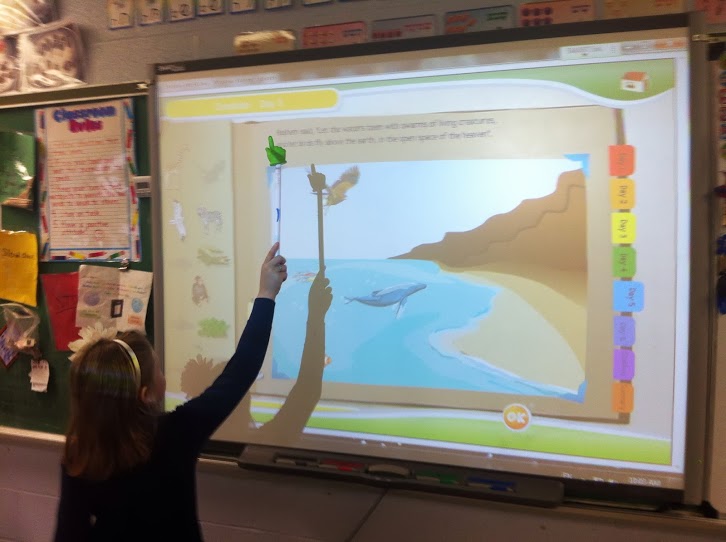
When using Shabbat Interactive in my classroom, my students had an enriched educational experience.  It was extremely engaging and they clearly could not get enough of it - they were yearning to learn more and more.  They were able to connect the pesukim (verses) about the Six Days of Creation to the activities within the program.  


Here, students are assembling a puzzle of the Mishkan (Tabernacle) that the Jews carried in the midbar (desert).  


A student is sequencing the steps of preparing the lighting of candles for Shabbat.  


Of  Shabbat Interactive's many great qualities, the one that I have found to be most beneficial is the ability for my students to make real world connections.  The Torah and the commandments about Shabbat were given by G-d to the Jewish People over thousands of years ago.  Hypothetically speaking, how can the commandments pertaining to Shabbat be applicable to this day?  There were no cars, cell phones, laptops or other electronic devices back then.  The Torah includes many shades of gray and calls for interpretation.  How is one supposed to know that the use of these modern devices are prohibited on the Sabbath?  


That's what's special about Shabbat Interactive.  Through interactive, engaging activities, the students learn the connections between the Torah and today.  This gives them a much deeper understanding as to why certain things are permissible and others are not even though the commandments were given many years ago.

So when planning your technology budget for the coming school year, make sure to consider Shabbat Interactive.  It is a great resource to use when teaching about the Six Days of Creation, the Jews in the desert, and of course about the Shabbat.  Your students will love using it to support their learning and will be ever grateful as mine were!